




The Madrid System allows a trademark owner to seek protection in multiple Madrid System members through one international application. Each designated member applies its own trademark law when deciding whether protection will be granted. WIPO’s eMadrid Find and Monitor tool provides access to information on international trademark registrations recorded under the Madrid System.
This article covers the Madrid System register, how to run a search on eMadrid, how to read what comes back, and what an empty result set does and does not tell you. It is written from the perspective of an Indian business owner planning to take a brand into international markets.
| Quick facts |
| Search at madrid.wipo.int under the Find and Monitor tab; a free WIPO account is required Search by trademark name, holder name, or registration number; refine using filters such as Nice class, designated member, and status Filter results by status: active, inactive, or pending Find and Monitor covers records in the Madrid International Register; it does not cover trademarks filed directly with national or regional offices An empty result set does not confirm your mark is free in any specific country |
What the Madrid System register contains
The Madrid System is an international trademark filing route administered by WIPO. An applicant must have a qualifying connection with a Madrid System member through nationality, domicile, or a real and effective business establishment, and must hold or have applied for a trademark at that member’s intellectual property office (the Office of origin). The application is filed through the Office of origin, which certifies and forwards it to WIPO; the applicant names the members where protection is needed (each called a designated member).
India acceded to the Madrid Protocol on 8 April 2013, and the Protocol entered into force for India on 8 July 2013 (under Chapter IVA of the Trade Marks Act 1999, inserted by the Trade Marks (Amendment) Act 2010). Since then, Indian businesses can file outward Madrid applications, and foreign applicants can designate India in their international filings.
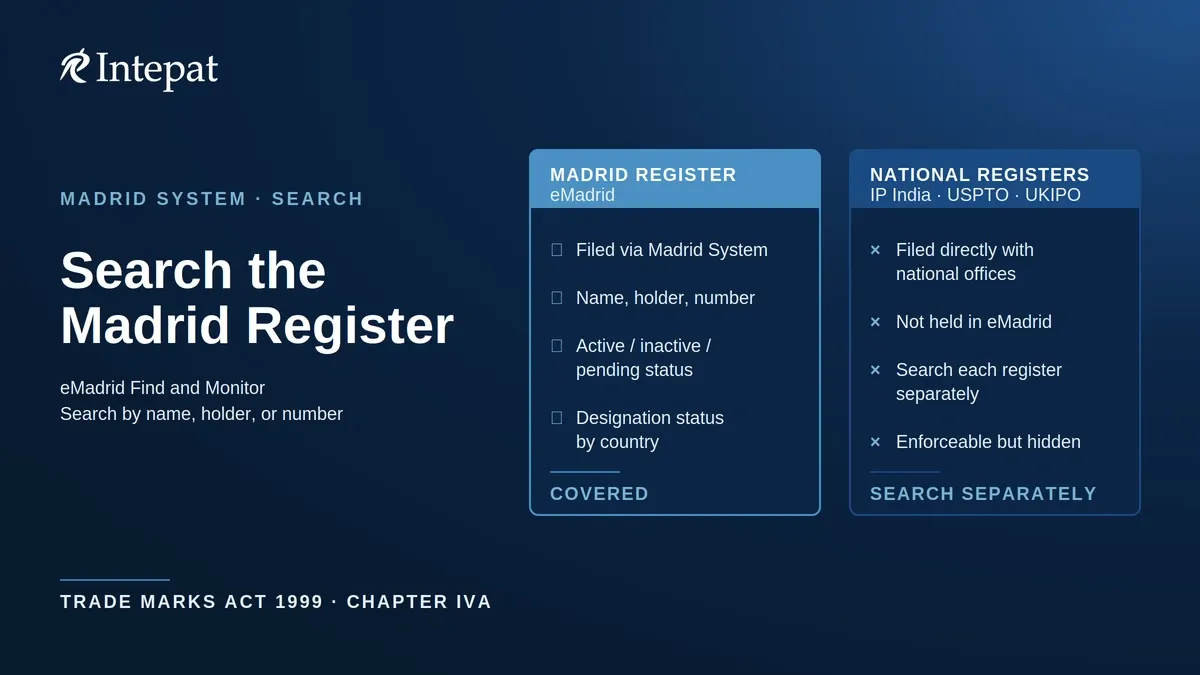
Find and Monitor provides access to records in the Madrid International Register, which you can filter by active, inactive, or pending status. It is a different resource from WIPO’s Global Brand Database, which combines records from multiple national, regional, and international collections including, but not limited to, Madrid System registrations.
What the register does not contain: trademarks filed directly with national offices that have never gone through the Madrid System. A business that registered its mark only with the US Patent and Trademark Office, or only with the IP India Trade Marks Registry, will not appear in this search unless it separately filed a Madrid application. That gap is covered in detail in the section on national registers below.
For a broader overview of international trademark search tools, see our guide to trademark search strategies.
eMadrid Find and Monitor: how to search
The primary tool for searching the Madrid register is eMadrid’s Find and Monitor feature at madrid.wipo.int (see WIPO’s Find and Monitor guidance). The older stand-alone Madrid Monitor tool remains available for advanced searches, but WIPO has confirmed it will be decommissioned once its functionality is fully incorporated into eMadrid Find and Monitor.
To run a search:
- Go to madrid.wipo.int and log in with a WIPO account (registration is free).
- Select the Find and Monitor tab.
- Enter your search term. The primary search inputs are trademark name, holder name, and international registration number.
- Refine the results using filters such as status (active, inactive, or pending), Nice class, designated member, and holder.
- Click any result to open the full record.
Search by name. Type the brand name you want to check. Search the proposed brand name and relevant spelling variants; an ordinary name search should not be treated as a complete phonetic, transliteration, or legal-similarity search.
Search by Nice class. Nice Classification is the international system for grouping goods and services into 45 categories for trademark purposes. If you sell goods in Class 25 (clothing), filter by that class number; you can combine a name search with a class filter to narrow results quickly. A Nice class is a search management tool, not a legal conflict boundary; marks covering related goods or services in another class may also be relevant. Use the Trademark Classification Tool to confirm the right class before you search.
Search by designation. If you are checking for conflicts in a target country, for example India or the United States, filter by designated member. This limits results to marks where that country has been named as a designated territory.
Download results. eMadrid lets you download your result list in PDF, CSV, and XML formats. You can also set up a watchlist to track competitors’ international registrations (see the section on next steps below).
The legacy Madrid Monitor (www3.wipo.int/madrid/monitor/en/) remains available as a stand-alone search interface, particularly for advanced searches. Madrid Monitor offers documented search syntax including Boolean operators (AND, OR, NOT), phonetic matching, fuzzy matching, and proximity operators, as well as email alerts for changes to specific third-party registrations. Both interfaces access Madrid System records, but WIPO documents different search functions for the two; Madrid Monitor’s advanced syntax should not be assumed to work identically in Find and Monitor.
Reading your results: status, designations, and what each means
Each record in your search results carries a status indicator. The main statuses are:
Active. The international registration is shown as active. This does not by itself establish that protection is in force in every designated member; check the designation-level status. An active mark with a similar name covering your target class and country is a potential obstacle.
Pending. The record has not yet reached active status. Open the full record and review the transaction history to identify the precise stage.
Inactive. The record is no longer in active status, through expiration, withdrawal, or another recorded event. Open the record and transaction history to identify the reason and the designations or goods and services affected before concluding the mark is no longer a risk.
When you open a full record, the Designation Status tab shows the status of protection country by country. For each designated member, you can see whether protection was granted, refused, or is still pending. Certified documents from the International Register can be ordered through eMadrid. The legacy Madrid Monitor additionally offers downloadable unofficial certificates of protection for individual designations; check the current interface for the document options available at the time of your search. A downloadable status document is not the same as a certified extract, which must be ordered separately.
The Nice classes listed per designation can differ from the overall registration. Limitations, cancellations, partial refusals, and country-specific transactions can affect the scope of protection in one designated country without affecting others. Read the designation-level detail, not just the headline record.
A record showing “Protection Granted” indicates that WIPO’s record shows protection was granted for that designation. Check the transaction history for subsequent modifications or cancellations before treating it as a current, subsisting right; where reliance matters, verify with the relevant national office. A granted status does not mean the mark will necessarily conflict with yours; that requires analysis of similarity, goods and services overlap, and the applicable legal standard.
What the search does not show: the national register gap
This is the most important limitation to understand before acting on a Madrid System search result.
The Madrid register contains only marks that went through the Madrid System. A company that registered its trademark directly with the Indian Trade Marks Registry, the USPTO, or the UKIPO, without a Madrid filing, will not appear in your eMadrid search, even though its mark is fully enforceable in its home country.
For India specifically, this means you need to run two separate searches before filing:
First, search eMadrid for any Madrid System marks that designate India. Second, search the Indian Trade Marks Registry’s Public Search portal (tmrsearch.ipindia.gov.in) for directly filed Indian marks. Cross-checking the two sources helps identify national-only filings, designation-level developments, and duplicate records, giving you a more complete picture of earlier applications and registrations in India.
The same logic applies to every target country. An eMadrid search returning no relevant results for Germany means only that the queries and filters used did not identify a potentially relevant Madrid record for that country. It is not a conclusion that no conflicting right exists in Germany. The German national register held by the DPMA is separate and needs its own search.
Our step-by-step guide to searching the Indian public trademark register covers the India national search in detail.
How this search fits into your pre-filing checklist for India
If you are an Indian business planning to file internationally through the Madrid System, a pre-filing search on eMadrid is a practical step, not an optional extra.
Step 1: Search eMadrid. Run searches for the proposed name and relevant spelling, phonetic, and transliteration variants. Review both active and pending records; a pending earlier mark can mature into a protected right. Where your proposed mark includes a logo or device element, conduct a separate image search using Madrid Monitor or the Global Brand Database.
Step 2: Search each national register separately. For each country where you want protection, search that country’s national trademark database. For India, use the Trade Marks Registry public search portal. For the US, use USPTO Trademark Search at tmsearch.uspto.gov. For the UK, use the UKIPO search portal.
Step 3: Assess your results together. Review your Madrid and national-register results side by side and remove duplicate records before assessing risk. The same Madrid designation may appear in both the WIPO register and the designated country’s national database as a single underlying right, not two separate rights. A mark appearing in only one database may still be a complete and enforceable obstacle.
Step 4: Take the results to a trademark professional. Similarity is a legal judgment, not a text-matching exercise. Whether a phonetically similar mark in another script creates a likelihood of confusion is a question that requires legal analysis, not just a database comparison.
Filing a Madrid application from India requires a basic application filed under Section 18 or a registration granted under Section 23 of the Trade Marks Act 1999. Filing is electronic through the Trade Marks International Application System (Rule 65). Where the application complies with the applicable requirements, the Trade Marks Registry certifies it and forwards it to WIPO within two months of receipt (Rule 66(2), Trade Marks Rules 2017); a non-compliant application is not forwarded until the deficiency is cured. A handling fee of Rs 5,000 is payable, e-filing only (First Schedule Entry 23, verified as of July 2026).
For guidance on the full filing process, see our Madrid Protocol filing service.
The five-year dependency: why an existing registration can still disappear
An active Madrid registration is not necessarily permanent. For the first five years from the date of international registration, it depends on the survival of the basic mark in the country of origin (the application or registration on which the Madrid filing was based). If that basic mark fails, the international registration can be restricted or cancelled to the same extent. This is known as central attack.
For outbound filings, Section 36D(5) of the Trade Marks Act 1999 and its proviso apply. For inbound designations, Section 36E(8) provides for cessation of protection in India where the basic application or registration fails within five years. Separately, Article 6(3) of the Madrid Protocol extends the consequence to specified proceedings, namely an appeal against refusal, an action seeking withdrawal, revocation, cancellation, or invalidation, or an opposition, commenced within the five-year period even where the final adverse decision comes later.
Transformation may preserve the filing date. If an international registration is cancelled under the dependency rule, the holder may, under Article 9quinquies and subject to national requirements, file national or regional applications within three months of the cancellation and retain the international registration date and any priority.
For a mark you find in your search that is under five years old, identify its basic application or registration and check its current status with the Office of origin’s national register; the Madrid transaction history may contain relevant notifications but is not a complete record of every pending national proceeding. For your own filing, assess the stability of your Indian basic mark: a pending challenge does not prevent a Madrid filing, but an adverse outcome during the dependency period may affect the international registration. Our guide to the Madrid Protocol for Indian businesses covers the Indian statutory provisions in detail.
After your search: three steps that matter
Get a professional clearance search. An eMadrid search is a starting point. It covers the Madrid register; it does not assess phonetic similarity, transliteration risks, well-known marks, or common-law rights in your target markets. A professional clearance search can be scoped to assess those risks and produce an opinion you can act on; confirm the coverage in the search scope. See our Trademark Search and Clearance service for details.
Monitor third-party marks through a watchlist. The Find and Monitor watchlist is designed for tracking competitors’ international registrations. Add any conflicting marks you identified in your pre-filing search to your watchlist to receive notifications when those records are updated. For international applications or registrations that you own or manage, use the eMadrid workbench, where alerts and management functions for your own assets are provided.
Read the Designation Status tab before drawing conclusions. An active mark in the top-level search result may have been refused in your target country. Open the record, click the Designation Status tab, and check the country-level detail before treating the mark as a live conflict. Status at the designation level tells you more than the headline record.
For a broader framework on building a clearance search strategy, see our guide to trademark clearance search strategy.
Frequently Asked Questions
Find and Monitor is the primary search and tracking tool within WIPO’s eMadrid platform, available at madrid.wipo.int. It allows users to search all international trademark registrations filed through the Madrid System by name, number, Nice class, or designated country, and to download results in multiple formats. A free WIPO account is required to use it.
No. Madrid Monitor (www3.wipo.int/madrid/monitor/en/) is WIPO’s older stand-alone search interface. Both draw on the same Madrid International Register data, but their interfaces differ. Madrid Monitor offers advanced syntax including phonetic and fuzzy matching; eMadrid Find and Monitor’s current guidance does not confirm the same. WIPO has stated it will decommission Madrid Monitor after migrating its functionality into eMadrid.
No. A search returning no relevant records means only that the queries and filters used did not identify a potentially relevant Madrid record. It does not establish that the mark is available or that no conflicting right exists. You must also search the relevant national or regional registers and assess legal similarity.
Open the record in eMadrid and click the Designation Status tab. Find India in the designated members list. The status shows whether protection was granted, refused, or is pending. Check the transaction history for subsequent modifications before relying on the status. Certified documents can be ordered through eMadrid; the legacy Madrid Monitor allows downloading unofficial certificates of protection.
Under Sections 36D(5) and 36E(8) of the Trade Marks Act 1999 and Article 6(3) of the Madrid Protocol, an international registration depends on its basic application or registration in the country of origin for five years. If that mark fails, the international registration ceases to have effect to that extent. A specified appeal, cancellation or invalidation action, withdrawal action, or opposition commenced within the period can have this effect even if decided later. This is central attack.
Yes. eMadrid Find and Monitor allows you to filter results by status. Select the Pending status to view applications that have been filed but have not yet been registered or refused. Pending applications can still mature into active registrations and are relevant to a pre-filing conflict check.
Yes, a WIPO account is required to use eMadrid Find and Monitor, and creating the account is free of charge at the WIPO website. WIPO has stated that the legacy Madrid Monitor will be decommissioned once its functionality has been incorporated into eMadrid, so new users are best served by creating a WIPO account and using eMadrid directly.
Disclaimer: This article explains the WIPO Madrid System trademark search tools as at July 2026 and is for general information only. It is not legal advice. Registry fees, forms, and procedures change; confirm current details with the Trade Marks Registry