




An EU trademark search checks whether a name or logo you want to use is already registered or applied for across the European Union. You run it free of charge on TMview, the official search tool hosted by the EUIPO. Searching before you file lowers the risk of a costly objection or a wasted application fee.
This guide covers what an EU trademark search is, how to run one step by step on TMview and eSearch plus, what those results actually tell you, and where the free tools fall short.
Quick answer
| Where to search | TMview (tmdn.org), free, covers all EU national IP offices, the EUIPO, and many non-EU participating offices. |
| Cost to search | Free. EUTM application fees are separate. |
| What EUIPO does | EUIPO examines absolute grounds (descriptiveness, lack of distinctiveness, or deceptiveness) on its own initiative and may issue a non-exhaustive EU search report if requested. It does not refuse an application on relative grounds unless the holder of an earlier right or another entitled party files an opposition. After registration, an earlier-right conflict may also be raised in invalidity proceedings. |
| Blind spots | Unregistered marks, trade names, and some well-known marks do not appear in the databases. No result is not a finding that the mark is available. |
| Get professional help when | You find identical or close hits, file across several Nice classes, your mark is a logo, or commercial stakes are high. |
What an EU trade mark search covers
A registered EU trade mark, formally called a European Union Trade Mark (EUTM), gives its owner rights across all 27 EU member states in one registration. A single EUTM is filed at, and managed by, the EUIPO (European Union Intellectual Property Office), headquartered in Alicante, Spain.
A trade mark search identifies earlier pending or registered marks that may be relevant to the availability of your proposed mark. A database hit does not automatically block you: the legal significance of any result must be assessed against multiple factors, including the filing date, territory of protection, the actual goods or services covered, and the degree of similarity between the marks.
The search also shows you pending applications, not just registered marks. A pending application with an earlier filing date could become an earlier right subject to its registration, and may be used to oppose yours if registration follows.
Why an EUIPO search report is not a clearance opinion
This is the point most people miss before their first EU filing.
The EUIPO examines every trade mark application for absolute grounds: whether the mark is descriptive, lacks distinctiveness, is deceptive, or is otherwise inherently unregistrable. That check happens on its own initiative, without you having to ask.
The EUIPO also offers an optional EU search report. If you request it in the advanced application form, the EUIPO draws up a report identifying earlier identical or similar EU trade marks, EUTM applications, and international registrations designating the EU for identical or similar goods and services. However, the EUIPO is explicit: this report is not exhaustive, and your mark could still be challenged even if no results appear. The report is not a conflict determination.
The EUIPO does not refuse an application on relative grounds because its search systems identify a potentially conflicting earlier mark. Under Regulation (EU) 2017/1001, earlier-right conflicts are decided only if an entitled party, typically the holder of the earlier right, raises that conflict in opposition proceedings. The EUIPO also sends informative surveillance letters to proprietors of earlier EU trade marks whose rights may potentially conflict with a new application. Those letters are purely informative and are not a finding that a conflict exists.
The opposition window is three months from publication of the EUTM application. If the earlier-right holder does not oppose within that period, your application may proceed to registration. However, registration does not close the risk entirely. The holder of an earlier right may subsequently apply for a declaration of invalidity before the EUIPO, or raise invalidity by counterclaim in infringement proceedings. Searching before filing allows you to investigate potential conflicts before incurring the EUTM application fee.
Where to search: the three free EUIPO tools
All three tools are free and publicly accessible without an account.
TMview is the starting point for most searches. Hosted at tmdn.org and managed by the EUIPO, it aggregates trade mark data from all EU national IP offices, the EUIPO, and many non-EU participating offices worldwide. TMview updates daily from each participating office’s own register.
Because TMview pulls data from national offices as well as the EUIPO, it is the right place to run a pan-European search. A mark registered only in Germany, for example, can still qualify as an earlier right for the purposes of opposing an EUTM application on relative grounds, and it appears in TMview.
eSearch plus is the EUIPO’s own database for EUIPO records: EU trade mark applications and registrations, international registrations designating the EU, design registrations, owner information, and bulletin entries. It gives you the detailed file status of a specific EUTM or international designation, including procedural stages and owner information. For decisions and judgments from EUIPO proceedings or the General Court and Court of Justice, use the separate tool eSearch Case Law. eSearch plus also provides image-based searching across published EUIPO trade mark and design records.
TMclass is the classification tool. It gives you access to the Harmonised Database used by EU offices and the databases of goods and services from offices worldwide. Before you run a name search, use TMclass to identify appropriate goods and services terms and the likely Nice classes.
| Note on Nice classes and EU trade mark law |
| Nice classes are a search and administrative tool, not a legal boundary for conflict. Under Article 33(7) of Regulation (EU) 2017/1001, goods and services are not considered similar merely because they appear in the same class, and are not considered dissimilar merely because they appear in different classes. What matters is the actual nature and overlap of the goods and services described in each mark’s specification. Use Nice classes to organize and narrow your search, but always review the actual goods and services description of any result that looks relevant, regardless of its class number. |
You can reach all three tools from the EUIPO’s trade mark search page at euipo.europa.eu/en/trade-marks/before-applying/availability.
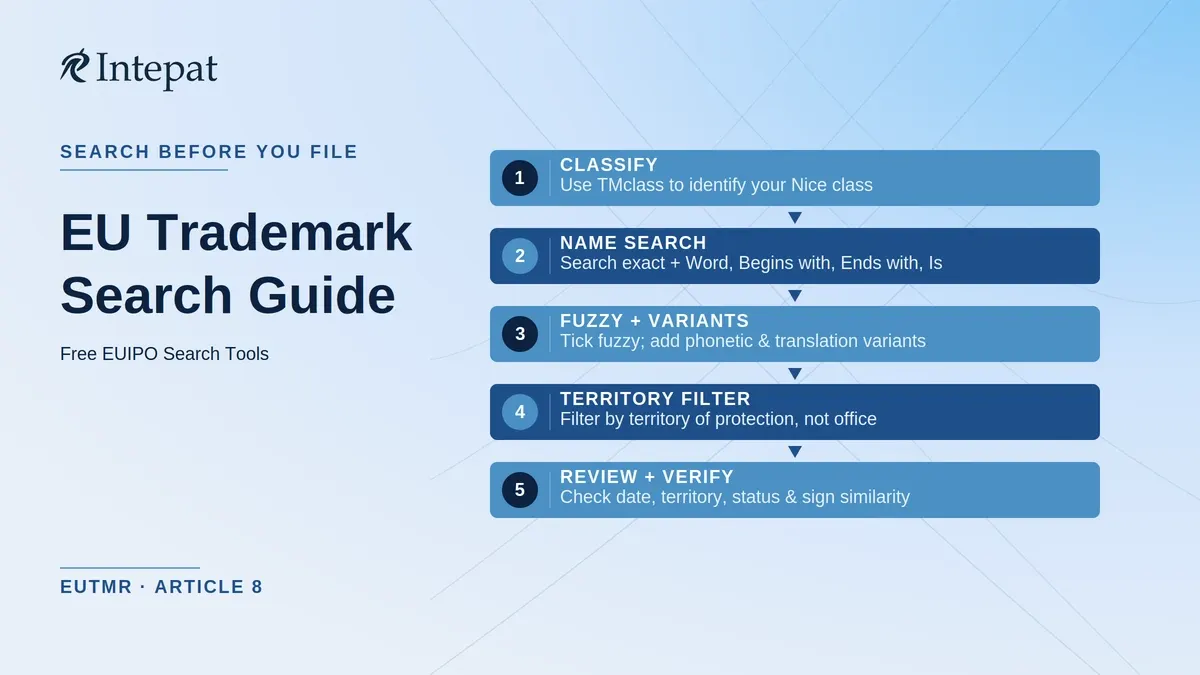
How to run a TMview search, step by step
Step 1: Identify your goods and services first. Before searching by name, use TMclass to identify appropriate goods and services terms and the likely Nice classes. This helps organise the search, but do not confine the review to class numbers alone, as relevant rights may be classified elsewhere.
Step 2: Type the name you want to search. Use your proposed mark name exactly as you intend to register it. TMview returns every mark where the entered string appears as a separate word. Also repeat the search using the other available search modes: Word, Begins with, Ends with, and exact Is. Manually search common phonetic spellings, translations, and transliterations of your mark name.
Step 3: Turn on fuzzy search. Tick the fuzzy search checkbox before pressing search. TMview’s fuzzy search uses the Levenshtein distance algorithm to find marks similar in spelling to the term you entered. A fuzzy search for “Roam,” for example, returns “Foam,” “Road,” and similar spelling variants. Fuzzy search covers spelling similarity only; phonetic equivalents, translations, and transliterations require the separate manual searches noted in Step 2.
Step 4: Filter by territory of protection, not only by office. This is the step most self-searchers get wrong. TMview distinguishes the office of origin (where the mark was filed) from the territory of protection (where the mark’s rights apply). A Madrid international registration may have been submitted through the applicant’s office of origin and registered by WIPO, but designates the EU as a territory of protection, making it a potential earlier right under the EUTMR. When filtering, select the relevant territory of protection, including EU (EUIPO) and individual EU member states, rather than filtering by office of origin alone.
Step 5: Filter by status. Filter to show active records only: applications pending examination and registrations currently in force. Expired, abandoned, and lapsed marks are generally lower priority in a first pass, though see the limits section below for an important qualification.
Step 6: Filter by Nice class. Select the class or classes confirmed in Step 1. Running a class-filtered search reduces noise, but conflict risk is not confined to identical classes: marks in other classes covering identical, similar, or commercially related goods or services can still be cited in opposition proceedings.
Step 7: Review the results list. For each result, note the mark name, owner, goods and services description, filing or priority date, territory of protection, and status. The filing or priority date matters: an earlier date means the mark may predate your proposed application and qualify as an earlier right under Article 8 of Regulation (EU) 2017/1001.
Step 8: Check eSearch plus for EUIPO-specific records. For any result that looks concerning, open eSearch plus and search the mark directly to see its detailed file status, owner information, and procedural history.
Reading your results: what to act on
A long results list is not automatically a problem. A database result becomes a potential legal concern only when several factors align.
When reviewing a result, the relevant questions are: does this mark predate my proposed filing date or priority date? Is it protected in the EU or an EU member state, rather than only in a non-EU territory? Is it currently active (pending or registered and in force)? Does it cover goods or services that overlap with mine? Does it look, sound, or convey the same meaning as my proposed mark?
If your search returns no results, or only results that do not align with those factors, the searched databases did not return a matching candidate. That is not the same as a finding that the mark is available or safe to file. The EUIPO itself states that a mark may still be challenged even when no results are returned, because the databases do not capture every earlier right.
An important boundary: a result in TMview representing a right protected only outside the EU (for example, a US-only or Japan-only registration with no EU-territory designation) does not, on that basis alone, constitute an earlier right capable of blocking an EUTM application under Article 8(2) of Regulation (EU) 2017/1001. Always check the territory of protection, not only the office of origin, before treating a result as legally relevant to your EU filing.
If you find similar but not identical marks, three dimensions matter for assessing the risk. First, visual similarity: how closely the marks look when placed side by side. Second, phonetic similarity: how closely the marks sound when spoken aloud, assessed from the perspective of the relevant public in the territory where the earlier right is protected. Third, conceptual similarity: whether the marks convey the same underlying idea or meaning. Under EU trade mark practice, marks are compared across all three dimensions together. The goods and services specifications are equally important: always read the actual specification, not just the class number, when assessing overlap.
This assessment is the work a trade mark attorney does after a database search. The search surfaces the candidates; the assessment, considering factors such as the distinctive character of the earlier mark and the elements shared by the marks, determines which ones are material concerns.
What a TMview search will not catch
The free tools have real limits, and this section names them plainly.
Unregistered marks. An earlier sign can support an opposition under Article 8(4) of Regulation (EU) 2017/1001 if it is used in trade, has more than mere local significance, predates the EUTM filing or priority date, and gives its holder the right to prohibit use of a later mark under applicable Union or member state law. Such rights do not ordinarily appear as registered rights in TMview or eSearch plus, but evidence of the sign may appear in company registers, domain records, or other commercial-use sources.
Well-known marks (unregistered). An unregistered mark that is well known in a member state within the meaning of Article 6bis of the Paris Convention may constitute an earlier mark under Article 8(2)(c) EUTMR for an opposition concerning identical or similar goods or services. Broader protection covering dissimilar goods or services requires a registered earlier mark with the required reputation and the additional conditions under Article 8(5) EUTMR.
Trade names and company names. Earlier business identifiers that have not been registered as trade marks can, in certain member states, qualify as earlier signs under Article 8(4) EUTMR if they meet the conditions above.
Recently filed applications. TMview receives daily updates from participating offices. For material results, verify the current status in the originating office’s official register or in eSearch plus for EUIPO records, rather than relying solely on the TMview snapshot.
Expired, abandoned, and lapsed marks. These are generally lower priority when assessing registered-right opposition risk. However, a lapsed registration does not necessarily mean the sign has ceased commercial use. Where a mark appears to remain in active use after its registration has lapsed, consider whether an unregistered-right claim under Article 8(4) might apply.
Search-field uniformity varies by office. EUIPO states that TMview covers all EU national IP offices. However, some search criteria are not available for every participating office. If a result from a specific national office is material, verify its status directly in that office’s own register.
Logos and device marks searched by image. A word-based search may retrieve a figurative or stylised mark where its verbal element has been indexed in TMview, but it will not reliably identify marks that are visually similar in their graphic composition. TMview’s image-search function was extended to all connected offices by November 2025. To run an image search, click the camera icon in TMview and upload your logo in JPG, PNG, GIF, or TIFF format. Run image searching separately from the name search whenever the proposed mark contains a graphical element. Consider also searching under any applicable Vienna Classification codes for figurative elements.
International registrations: EU designation vs national designations. A Madrid international registration may designate the European Union as a single territory, or may separately designate individual EU member states. These are legally distinct. An international registration designating the EU has the same effect as an EUTM application and, once protected, the same effect as an EUTM registration: it is a unitary EU right. A separate designation of an individual member state has effect only in that designated territory. Both types of designations appear in TMview and are retrievable by selecting the appropriate territory of protection when filtering.
A TMview search is a meaningful first check. It is not a comprehensive clearance opinion.
When a professional search is worth it
Running TMview yourself makes sense for an early-stage name check: confirming that an obvious identical mark does not already exist before investing further in a brand. If the name passes that check, a professional EU trade mark clearance review covers ground the free tools cannot reach.
Depending on the scope agreed, a professional clearance review may include phonetic and visual similarity analysis beyond spelling-variant results, review of EU and national records beyond what TMview’s filters surface, checks of selected commercial-use sources for unregistered right candidates, and legal assessment of the material results. No search method can guarantee comprehensive identification of every unregistered, trade-name, or other non-database right across 27 member states.
The step that adds most value is reading the results: whether a similar mark represents a realistic opposition risk, given the goods and services overlap, the territory, the distinctive character of the earlier mark and of the elements shared between the marks, and the filing dates.
If you are filing across multiple Nice classes, protecting a logo rather than a word mark, or preparing for a brand launch where a conflict would be commercially damaging, a professional EU clearance search is worth commissioning before you file.
For an overview of how EU trademark search fits into a broader multi-jurisdiction strategy, including searches in the UK (which is now a separate jurisdiction since Brexit), the US, and via WIPO’s Madrid system, see our complete trademark search guide at /blog/trademark-search.
Frequently Asked Questions
An EU trademark search identifies earlier pending applications and registered marks that may be relevant to a proposed name, phrase, or logo. TMview provides a free preliminary search across EUIPO, EU national offices, and many participating international databases. Results require legal assessment to determine whether they represent relevant earlier rights.
Yes. TMview, eSearch plus, and TMclass are all publicly accessible and free of charge, without an account. The EUIPO does not charge to search its databases. Application fees are separate and apply only when you file a trade mark application.
EUIPO checks absolute grounds on its own initiative and may provide a non-exhaustive search report on request. It does not refuse an application on relative grounds unless the holder of an earlier right or another entitled party files an opposition. If no opposition is filed, the application may proceed. The resulting registration may still be challenged through invalidity proceedings.
TMview covers marks from all EU national IP offices, the EUIPO, and many non-EU participating offices globally. It is the wider search. eSearch plus covers EUIPO records only: EU trade mark applications, registrations, international registrations designating the EU, designs, owners, and bulletins. For EUIPO decisions and court judgments, use eSearch Case Law. For a pan-European search, start with TMview.
A Nice class is one of 45 categories grouping goods and services under the Nice Agreement. Your EU trade mark application must specify which classes it covers. A class filter helps organise the search but may miss relevant rights in other classes. Under EU law, same-class goods are not automatically similar and different-class goods not automatically unrelated: the actual specification governs.
A UK-only trade mark does not, by itself, block an EUTM application. Since 1 January 2021, the UK is outside the EU trade mark territory. Separate protection is needed in each jurisdiction, whether through direct filing or appropriate Madrid designations. Our UK trademark search guide at /blog/uk-trademark-search covers the UKIPO search process.
Yes, in some circumstances. Under Article 8(4) of Regulation (EU) 2017/1001, an earlier non-registered sign can support an opposition if it is used in trade, has more than mere local significance, predates the EUTM filing or priority date, and gives its holder the right to prohibit use of a later mark under applicable law. Such signs do not appear in TMview.
This article is for general information only and does not constitute legal advice. EU trade mark law is governed by Regulation (EU) 2017/1001 and the practices of the EUIPO, which are subject to change. Database coverage and update frequency reflect sources cited and may change as offices update their data. For advice on your specific mark and goods or services, consult a qualified trade mark attorney. Verified as of July 2026.