




An Indian patent search is a query of the Indian Patent Office’s publicly available database for published applications and granted patents. The official database is InPASS (Indian Patent Advanced Search System), maintained by IP India and accessible without registration at the IP India InPASS portal.
AT A GLANCE
| What InPASS gives you | Full-text search across publicly available published Indian patent applications and granted Indian patent records, with Boolean and wildcard operator support |
| What InPASS does not cover | International prior art (USPTO, Espacenet, WIPO PATENTSCOPE), non-patent literature, prior art analysis, freedom-to-operate assessment |
| When a professional search is warranted | Before any patent filing; when InPASS returns closely related results; when a filing decision or a licensing assessment depends on a written opinion |
| Quick steps: Open InPASS and select both granted patents and published applications. Search by keyword using Boolean/wildcard operators, then by IPC code, then by applicant or inventor name. Open relevant results and review the full specification and status. Cross-check the Patent Journal for recently published records. Expand the search to international databases and non-patent literature before making a filing decision. |
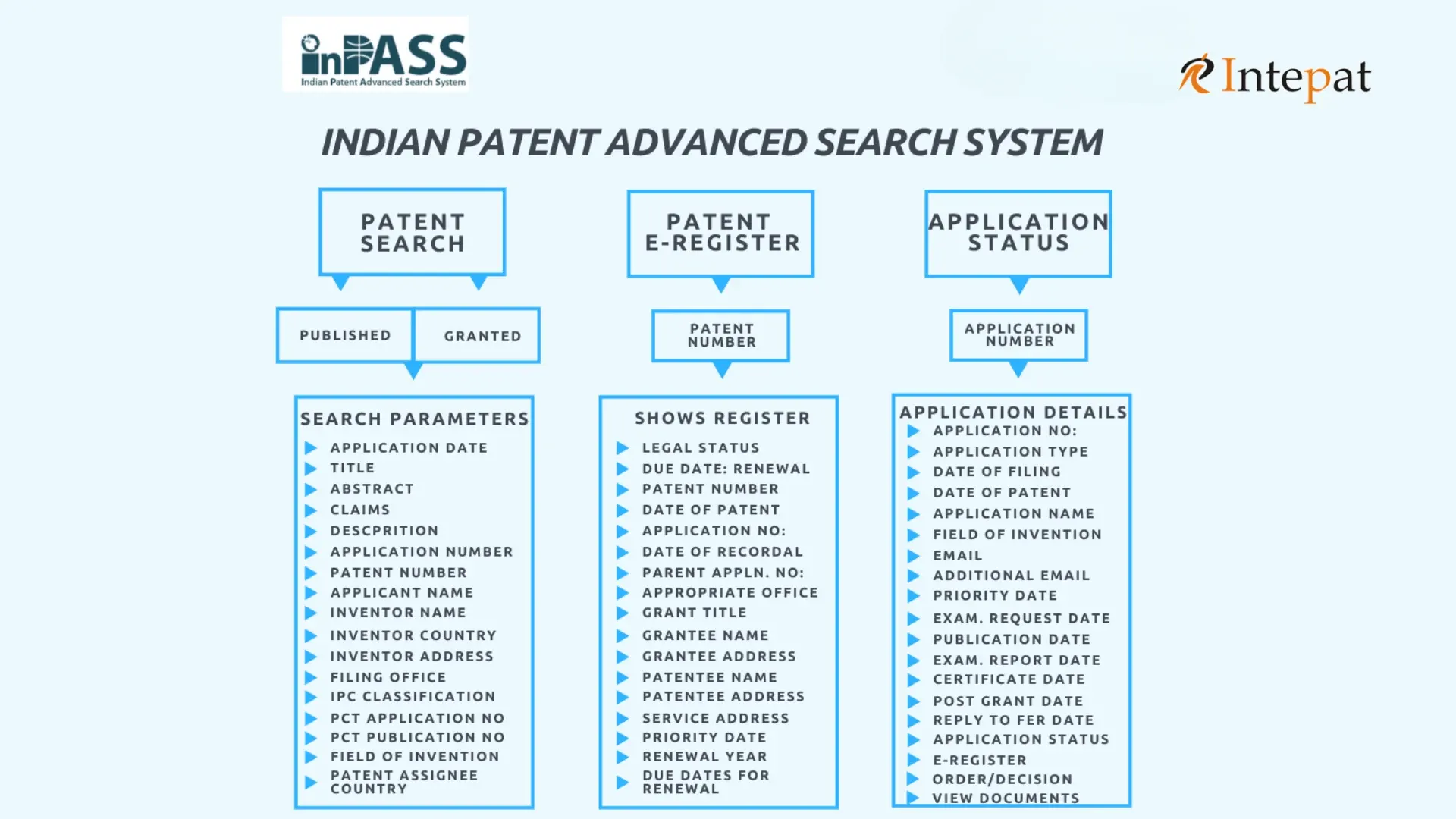
InPASS: What It Covers and Where It Stops
InPASS is the official public database of the Indian Patent Office, accessible through the IP India portal without registration. It replaced the earlier IPAIRS system and provides full-text search across publicly available published Indian patent applications and granted Indian patent records, with support for Boolean operators (AND, OR, NOT) and wildcard characters.
The database is organised around four menu tabs: Patent Search, Patent E-register, Application Status, and Help (as of March 2026). The Patent Search tab allows searches across seventeen parameters including application date range, title, abstract, claims, description, application number, patent number, applicant name, inventor name, International Patent Classification (IPC) code, and PCT application number for national phase entries.
Known InPASS limitations (as of March 2026):
- Search results are capped at 1,000 records per query; display is limited to 25 records per page
- Coverage is limited to publicly available published Indian patent applications and granted Indian patent records
- International patent databases (USPTO, Espacenet, WIPO PATENTSCOPE) are not indexed
- Non-patent literature (scientific journals, standards documents, product manuals, technical reports, academic papers) is not covered
- Applications filed within the last 18 months and not yet published are not visible
- InPASS returns bibliographic data and specification text only; it does not produce a patentability opinion
Handling the 1,000-result cap:
When a broad keyword or IPC search returns 1,000 results, the cap is likely truncating relevant records. Split the search into narrower queries: search by IPC subgroup rather than subclass, restrict by filing year or publication date range, combine keyword clusters with IPC codes, search applicant name separately, and split keyword queries by field (title only, then abstract only, then claims only). Running several targeted queries yields better coverage than a single broad query.
| Need a Patent Search? Covers Indian and international databases with a written patentability assessment. >> Request a Search >> |
InPASS Search Parameters: Quick Reference
The table below maps each search type to when it is most useful, an example query, and its practical limitation.
| Search type | When to use | Example | Limitation |
| Keyword | First-pass scan for technology field | aerogel AND thermal AND insulation | Misses synonyms, transliteration variants, classification-only filings |
| IPC classification | Technology-area sweep regardless of wording | F16L 59/02 (pipe thermal insulation) | Requires knowledge of correct IPC subgroup |
| Applicant name | Competitor landscape; assignee tracking | Tata Consultancy Services | Name recording varies; separate searches required |
| Inventor name | Tracking a specific inventor’s filings | Sharma Rajesh Kumar | Name recording inconsistent; common names ambiguous |
| Application number | Check a known application | 202141045678 | Requires exact number; format varies by year and office |
| Patent number | Verify a granted patent | IN345678 | Granted patents only; use Patent E-register for legal status |
| PCT application number | Find national phase entries for a PCT filing | PCT/IN2022/050123 | National phase entries only; use WIPO PATENTSCOPE for international stage |
| Date range | Limit to recent filings; year-by-year sweep | Publication date: 01/01/2022 to 31/12/2022 | Requires multiple queries to cover full periods |
How to Search InPASS: Step by Step
Step 1: Access the database
InPASS is available at the IP India InPASS portal. No registration or login is required for a basic search.
Step 2: Select the record type
In the Patent Search tab, two checkboxes allow you to search granted patents, published applications, or both. Select both for a complete search.
Step 3: Run a keyword search
Collect the technical keywords that describe your invention’s core features. Keyword searches operate across the title, abstract, claims, and description fields. Apply Boolean operators to refine your query:
- AND narrows results: thermal AND insulation AND aerogel returns only records mentioning all three terms
- OR broadens results: aerogel OR airgel captures spelling variants
- NOT excludes results: thermal AND insulation NOT building removes records where building appears
Wildcard characters extend keyword coverage: encrypt* retrieves encrypt, encryption, encrypted, and similar terms. Run multiple keyword iterations using different combinations; a single query rarely covers a technology field fully.
Step 4: Search by IPC classification
If you know the International Patent Classification (IPC) code for your technology area, search by IPC code in the relevant field. IPC codes are hierarchical: a broad subclass search returns more results but reduces precision; a narrower subgroup search is more targeted. An IPC-based search retrieves relevant applications regardless of how different applicants described the same technology in words.
If you are not familiar with IPC classification, the WIPO IPC Publication tool allows you to search for the relevant class and subgroup.
Step 5: Search by applicant or inventor name
Enter an applicant or inventor name to retrieve all published applications filed in that name. This is useful for identifying what competitors are filing in a technology area. The search is string-based: variations in how a name is recorded (for example, “Tata Consultancy” versus “TCS”) may produce different result sets and may require separate searches.
Step 6: Search by Indian patent application number
To locate a specific published application, enter the application number in the application number field of the Patent Search tab. Indian patent application numbers follow the format YYYYPPNNNNNN, where YYYY is the year of filing and PP is the office code (11 for Delhi, 21 for Mumbai, 31 for Kolkata, 41 for Chennai). For a known application number, this is the most direct route to the full published record. Alternatively, the Application Status tab provides the current procedural stage of an application directly by application number, without going through the Patent Search interface.
Step 7: Search by Indian patent number
To locate a specific granted patent, enter the patent number in the patent number field. Indian patent numbers follow the format IN followed by a six-digit number (for example, IN345678). For the legal status of a granted patent, including next renewal date and encumbrances, use the Patent E-register tab rather than the Patent Search tab.
Step 8: Review search results
Results appear in two columns. The left column shows the application or patent number, title, date, and status. Selecting a row loads the full record in the right column across three tabs: Bibliographic Data, Specification, and Status.
The Specification tab displays the full published text including description, examples, drawings, abstract, and claims. When reviewing a retrieved result for relevance to your invention, read the full specification, not just the abstract or the claims: a specific embodiment described in the body of a specification can be relevant to your invention even where it does not appear in the claims.
A published application is not an enforceable granted patent; enforceable rights arise only after grant. When reviewing results, check the Status tab on each record to confirm whether the application has been granted, is still pending, or has lapsed.
Where a retrieved patent or application appears closely related, inspect the file-wrapper documents available through the Patent E-register where accessible. First Examination Reports, amendments, and hearing notices show how the claims were interpreted and modified during prosecution.
Step 9: Check application status
The Application Status tab allows you to check the current procedural stage of an application by entering the application number. For a more detailed explanation of status codes, see the Indian patent application status guide. The Patent E-register tab allows you to check the legal status of a granted patent, including next renewal date.
Step 10: Cross-check the Patent Journal
The Indian Patent Office publishes the Patent Journal every Friday. It records newly published applications and recent grants. Checking the Journal can be useful as a cross-check for recently published records that may not yet be fully indexed in InPASS search results.
How to Read and Interpret InPASS Results
Retrieving a list of results is the first step. Evaluating what those results mean for your application requires a closer reading of the retrieved documents.
When reviewing a retrieved patent or application, do not limit your reading to the abstract. The abstract is a brief summary; the claims define the scope of legal protection; and the description, examples, drawings, and embodiments each form part of the disclosure. A specific embodiment described only in the body of a specification, without a corresponding claim, can still be directly relevant to your invention.
A published application is not an enforceable granted patent; enforceable rights arise only after grant. Check the Status tab on each result to confirm grant status before drawing conclusions about the risk a retrieved document poses.
Where prosecution history is available through the Patent E-register, review it. First Examination Reports and amendments show how the scope of the claims changed during examination. A patent whose claims appear broad as filed may have been significantly narrowed before grant.
A self-search on InPASS can miss prior art through several routes: synonyms and transliteration variants not captured by keyword queries; recently filed but not yet published applications; non-patent literature including academic papers, standards, and product manuals; and foreign patent families not in national phase in India. A list of InPASS results is not a novelty clearance opinion.
InPASS vs a Professional Patent Search: What the Difference Means
The difference between an InPASS self-search and a professional patentability search is scope and output. Both involve searching patent databases. A professional search additionally covers databases that InPASS does not, includes non-patent literature, and produces a written analytical report rather than a result list.
| InPASS self-search | Professional patentability search | |
| Indian patent database | Yes | Yes |
| International databases (USPTO, Espacenet, WIPO) | No | Yes |
| Non-patent literature | No | Yes |
| IPC classification strategy | User-selected | Expert-mapped across all relevant subgroups |
| Output format | Retrieved bibliographic records | Written analysis with patentability opinion |
| Freedom-to-operate (FTO) analysis | Not available | Separate FTO/clearance search required unless specifically scoped |
| Conducted by a registered patent agent | No | Yes |
Prior art is not limited to Indian published patents. An invention can be anticipated by a patent filed in Japan, a paper published in a German journal, or a product demonstrated at a trade exhibition anywhere in the world. A search limited to InPASS does not cover any of those sources and is, by construction, incomplete as a prior art search.
Where an InPASS search is used as a preliminary step before commissioning a professional search, it can usefully identify whether a technology field is active in India, which IPC subclasses are most populated, and which applicants are already filing. That information frames the brief for a professional search. It does not replace the professional search for a filing decision.
| Commission a Patent Search Indian and international databases, non-patent literature, written patentability assessment. >> Contact Intepat >> |
InPASS Search Checklist
Before moving to a professional search or a filing decision, confirm each InPASS search type has been run:
- InPASS searched by primary keywords using AND/OR/NOT operators
- InPASS searched with synonym and transliteration variants
- InPASS searched by relevant IPC subgroup codes
- InPASS searched by competitor applicant name
- Patent Journal checked for recently published records
Frequently Asked Questions
No. InPASS covers publicly available published Indian patent applications and granted Indian patent records. A prior art search adequate for a filing decision also covers international patent databases (USPTO, Espacenet, WIPO PATENTSCOPE) and non-patent literature, including academic papers, standards documents, product manuals, and conference proceedings. InPASS does not cover foreign patent databases, unpublished applications filed within the past 18 months, or any non-patent document. It is a useful first step, but it does not replace a professional search covering all relevant prior art sources.
No. The Patents Act 1970 does not require an applicant to conduct a prior art search before filing. However, the novelty requirement under Section 2(1)(j) and the inventive step requirement under Section 2(1)(ja) mean that prior art found anywhere in the world can defeat a patent application at examination. Filing without a search carries the risk that a prior art objection will arise after fees and agent costs have been committed. A pre-filing search is strongly recommended as a risk-management step, not a procedural one.
A patentability search examines prior art to assess whether an invention is novel and involves an inventive step, to inform a decision about whether and how to file a patent application. A freedom-to-operate (FTO) search examines currently in-force third-party patents to assess whether making, using, or selling a specific product would infringe an existing patent. Both are distinct exercises with different objectives. An applicant can have a patentable invention that still requires FTO clearance before commercial launch. See freedom-to-operate search and opinion for a fuller explanation.
InPASS Patent Search is the full-text search interface: use it to find published applications and granted patents by keyword, IPC code, applicant name, or number. The Application Status tab shows the current procedural stage of a patent application, such as whether a First Examination Report has been issued or the application is pending grant. The Patent E-register shows the legal status of a granted patent, including whether it is in force, the next renewal date, and any registered licences or encumbrances. All three are accessible through the IP India portal; each serves a different purpose.
Indian patent applications are ordinarily not open to public inspection until 18 months from the filing date or priority date under Section 11A of the Patents Act 1970. Applications filed within the past 18 months will generally not yet be visible in InPASS. This publication lag means a search cannot identify recently filed but unpublished applications, which may affect a novelty assessment in an active technology field.
InPASS includes Indian national phase applications after they have been published under Section 11A. PCT applications at the international stage, before national phase entry in India, are searchable on WIPO PATENTSCOPE. For a search covering PCT applications, both InPASS and PATENTSCOPE should be used. The free patent search tools guide covers other databases for supplementary searches, including Espacenet, Google Patents, and USPTO Patent Center.
Intepat’s patent search service covers Indian (InPASS), international (Espacenet, USPTO, WIPO PATENTSCOPE), and non-patent literature databases. The search report includes a bibliographic summary of retrieved prior art, a mapping of the technical features of the closest prior art against the invention’s key features across the full prior art disclosure, and a written patentability assessment. The search is conducted by a registered Indian patent agent (IN/PA-1545).
InPASS is the Indian Patent Office’s public search database and the starting point for any Indian patent search. It provides full-text search across publicly available published Indian patent applications and granted Indian patent records, with support for Boolean operators, wildcard characters, and IPC classification searches, across seventeen searchable parameters.
The database’s primary limitation is scope: it covers Indian published patent literature only, caps results at 1,000 records per query, and does not cover international databases, non-patent literature, or unpublished applications. A search limited to InPASS is, by construction, incomplete as a prior art search for a filing decision. For filing decisions, FTO clearance before commercial launch, or any matter requiring a written patentability opinion, a professional search covering Indian and international databases is the appropriate step.
| Start Your Patent Search Professional search by a registered Indian patent agent covering all major databases. >> Request a Search >> |
Disclaimer: This article provides general information about the InPASS database and the Indian patent search process. It does not constitute legal advice. The relevance of any prior art to a specific invention, and the patentability assessment of any proposed application, should be assessed by a registered patent agent. Intepat IP provides intellectual property services and is not a general legal practice.