




A US trademark search checks the USPTO federal trademark register for earlier marks that could conflict with a proposed mark under Section 2(d) of the Lanham Act. The current system is the Cloud-based USPTO Trademark Search , which replaced TESS on 30 November 2023. Expert mode, field tags, and regex are the practitioner’s tools.
Quick Answer
| Question | Answer |
| What is a US trademark search? | A check of the USPTO federal register for earlier registered marks and pending applications that could conflict under Section 2(d) of the Lanham Act (15 U.S.C. § 1052(d)) |
| Where is the official search? | tmsearch.uspto.gov (free, no login required for basic searching) |
| What replaced TESS? | The Cloud-based USPTO Trademark Search, in effect since 30 November 2023 |
| What is the practitioner’s search mode? | Expert mode, which enables Field Tag, Search Builder, and regex |
| What standard does the examiner apply? | Section 2(d) likelihood of confusion, assessed using the DuPont factors (In re E.I. du Pont de Nemours, 476 F.2d 1357 (C.C.P.A. 1973)) |
| What does the federal search not cover? | Common-law unregistered marks and state trademark registries (50 states, DC, Puerto Rico) |
Why a US Trademark Search Matters for Indian Applicants
Any Indian applicant proposing to extend a brand to the United States faces the same examination at the USPTO regardless of the route taken. A direct application under Section 1(b) of the Lanham Act (intent-to-use), a Section 44 application based on a corresponding Indian application under the Paris Convention, and a Section 66(a) extension of an International Registration under the Madrid Protocol are all examined by a USPTO examining attorney for compliance with Section 2(d) likelihood-of-confusion grounds.
If an earlier conflicting mark exists on the federal register or in pending applications, the examiner issues an Office Action citing it. The response period is three months from the issue date for Section 1 and Section 44 applications (extendable once by three months for a fee), and six months for Section 66(a) Madrid applications (no extension available). Running a pre-filing search identifies those conflicts in advance and allows the applicant to modify the mark, narrow the goods or services, or decide not to file before incurring the filing fee and counsel costs.
For Madrid Section 66(a) extensions in particular, conflict at the USPTO surfaces late: the International Registration has already been filed at WIPO and the designation already paid for. A pre-filing US search before designating the United States in the Madrid application is the only practical way to manage this risk. The Indian trademark search guide covers the Indian framework; this article is the US procedural complement.
The timing point deserves emphasis. A US clearance run after the Indian filing has been completed and the Madrid international application is being prepared catches conflicts when they can still be addressed by modifying the proposed mark or narrowing the goods and services list before international filing. A US clearance run after the WIPO designation has been notified to the USPTO catches the same conflicts at a stage where modification options are narrower and the response burden falls on US-licensed counsel. Front-loading the US search to the international-application preparation stage is the lower-cost path.
The USPTO Trademark Search System: From TESS to Cloud
The Trademark Electronic Search System (TESS) served as the USPTO’s public-facing trademark search database for over two decades. On 30 November 2023, the USPTO retired TESS and migrated to a Cloud-based system simply titled USPTO Trademark Search.
The new system is structurally different. Searches use industry-standard syntax: Boolean operators (AND, OR, AND NOT), field tags addressing specific data fields, wildcards, and regular expressions. Old TESS bookmarks now redirect. Search strings that worked in TESS do not work in the new system without re-formatting, and the USPTO publishes a Transitioning from TESS handout for practitioners migrating their saved queries.
For an Indian practitioner, the practical consequence is that any US trademark search article, training material, or internal guide pre-dating December 2023 that references TESS is operationally obsolete. Any 2024 or later article that still treats TESS as live is a credibility tell. The current system is verified as of May 2026.
Basic Mode vs Expert Mode
The USPTO Trademark Search interface defaults to a basic search using a drop-down menu (Wordmark, Owner, Goods/Services, and so on). Basic mode is acceptable for a fast knockout check on an exact word, but USPTO guidance recommends Expert mode over the General search for substantive clearance work because of the better-targeted result sets that field-tag and regex syntax produce.
Expert mode is enabled by clicking the Expert button near the search bar. Once on, three capabilities open up that basic mode does not provide:
- Field Tag searching. Search a specific data field rather than every field at once.
- Search Builder. Construct multi-field, multi-operator queries through a guided interface, without memorising the full syntax.
- Combined line searches. Reference earlier numbered queries in the session and combine them with logical operators.
Logging in to a free USPTO.gov account is recommended before searching in Expert mode. It reduces session errors during high-traffic periods, makes the summary page available when opening a result (a replacement for the TESS summary page many practitioners relied on), and allows tagging and exporting of results.
Field Tag Searching
Field tags are the core of practitioner-grade searching on the USPTO system. Each tag points to one data field within a trademark record; the search term applies only to that field. The syntax follows three rules: tags are in all caps; tags are followed by a colon; search terms are in lowercase.
The complete tag list is maintained at tmsearch.uspto.gov/help. The tags most relevant to a pre-filing clearance search are set out below. USPTO field tags and search behaviour may change as the search system is updated; practitioners should verify the current tag list against the live help page before relying on archived internal templates.
| Field tag | Field | Example |
| CM: | Combined mark (word, pseudo mark, translation, transliteration fields combined) | CM:fiesta |
| LD: | Live or dead indicator | LD:true or LD:false |
| IC: | International class | IC:025 |
| CC: | Coordinated class | CC:009 |
| GS: | Goods and services description | GS:”dietary supplements” |
| DC: | Design code (six-digit USPTO Design Search Code) | DC:26.17.04 or DC:261704 |
| DE: | Description of the mark | DE:panda |
| RG: | Register (principal or supplemental) | RG:principal |
| RN: | Registration number | RN:6832052 |
| SN: | Serial number | SN:90866054 |
| DS: | Disclaimer text | DS:beauty |
| OW: | Owner name, address, or entity | OW:”registrant inc” |
| ON: | Owner name (narrower than OW) | ON:”world wide” |
| AT: | Attorney of record | AT:”jane smith” |
| FD: | Filing date | FD:[20230701 TO 20230731] |
| PO: | Published for opposition | PO:* |
The CM: tag is the most-used in clearance work because it searches across the word mark, the pseudo mark (the USPTO’s normalised version of stylised marks), translation, and transliteration in a single pass. A bare CM:fiesta returns every record where the combined mark field contains the word fiesta in any of those forms.
The LD: tag restricts a search to live or dead records. For pre-filing clearance, the practical default is LD:true because Section 2(d) operates on live earlier marks and pending applications. Dead marks are not earlier trade marks for Section 2(d) purposes but the prior user may retain common-law rights, which the federal search does not surface in any event.
The IC: and CC: tags target classes. IC: uses the Nice International Classification (the same system used by the Indian register and by WIPO). CC: uses USPTO’s coordinated classes, which group commercially related international classes for search purposes. Coordinated-class searching is a practitioner technique for surfacing conflicts across related classes that the applicant’s filed class alone would not catch.
Wildcards and Regex Searching
The USPTO system supports two wildcards within field tag searches:
- ? matches exactly one character (other than a space)
- * matches zero, one, or more characters (other than a space)
Wildcards cannot be used inside quotation marks. CM:fiesta* returns fiesta, fiestas, fiestaware, and any other extension. CM:f?esta returns fiesta, fresta, fuesta, and so on, each with exactly one variable character.
The system also supports regular expression syntax, enclosed in forward slashes. Practitioners use regex to construct precise variant searches that wildcards alone cannot express. The official searching guidance gives examples such as CM:/.*uspto.*/ to return any combined mark containing uspto in any position with any prefix or suffix.
A more practitioner-relevant example: for the proposed mark NUTRIVA, a clearance regex CM:/.*nutr.*/ returns every combined mark beginning with or containing the nutr stem. Combined with a class restriction such as IC:005 OR IC:029 OR IC:030, this produces a manageable result set covering the pharmaceutical and food-and-beverage clusters where a nutr-stemmed mark is most likely to conflict.
Smart punctuation must be turned off on the device used for searching. The system requires straight quotes; curly quotes silently break the search.
Phonetic and Sound-Alike Searching
The Indian public search system at tmrsearch.ipindia.gov.in offers a dedicated phonetic search mode where the examiner or applicant enters a phonetic variant and the system returns marks with phonetic similarity. The USPTO Trademark Search system does not offer an equivalent built-in phonetic mode.
What the USPTO system offers instead is regex-based alternative-spelling construction. A practitioner running a clearance for NUTRIVA on the USPTO system constructs a regex that captures common phonetic variants explicitly:
CM:/(nutriva|nutreva|newtriva|nutrieva|nutryva|nutrievah)/ AND LD:true
Each variant is listed; the OR operator within the regex group returns any match. This approach is more transparent than a single phonetic-similarity setting because the practitioner controls which variants are tested. It is also more labour-intensive: the examiner or practitioner is responsible for thinking through the phonetic equivalents.
For an Indian applicant whose proposed mark is a transliteration from Devanagari or another Indic script, the phonetic-variant list should account for variant Roman transliterations the USPTO examiner is likely to construct (for example, Kumar, Kumaar, Coomar, Koomar). Failing to consider transliteration variants is a common pre-filing search gap when the Indian filer has only ever seen the mark in one canonical Roman form.
Design Search Codes and Image Search
Where the proposed mark includes a logo, figurative element, or composite device, the federal search must include a design code component. The USPTO uses its own Design Search Code Manual, which is distinct from the WIPO Vienna Classification used in India and the EU. Each design code is a six-digit number organised as Category.Division.Section.
For example:
- 01.01.03 covers a single star with five points (Category 01 celestial bodies, Division 01 stars and comets, Section 03)
- 26.17.04 covers vertical lines (Category 26 geometric figures, Division 17 lines and bands, Section 04)
- 03.01.04 covers domestic cats (Category 03 animals, Division 01 felines, Section 04)
A practitioner running a clearance for a composite logo identifies the relevant design codes for every figurative element in the mark and searches each code, in combination with the class. The query DC:01.01.03 AND IC:025 AND LD:true returns every live application or registration in International Class 25 (clothing) whose design includes a five-pointed star.
The USPTO Trademark Search system also offers an image search feature for logged-in USPTO.gov account holders. The user uploads an image and the system returns similar marks. Image search operates separately from design code search and produces visual similarity results without requiring the user to identify codes manually. For a complex logo, image search is a useful first pass; design code search is the controlled second pass that catches what image similarity may miss.
Combined Line Searches with Logical Operators
In Expert mode, every search executed in a session is numbered and held in the search history. A practitioner can reference earlier queries by number and combine them with logical operators. The mechanics:
- Run query 1: CM:nutriva AND LD:true
- Run query 2: CM:/(nutreva|newtriva|nutrieva)/ AND LD:true
- Run query 3: IC:005 OR IC:029 OR IC:030
- Combine: (1 OR 2) AND 3
This produces the set of live records that contain nutriva exactly or one of its phonetic variants, restricted to the relevant class groups. The same result is achievable in a single long regex query, but the combined-line approach is easier to audit and easier to share with a colleague reviewing the search.
Search history is viewable by clicking into the search bar and clearing the current text. Earlier queries appear numbered. The history persists only within the session; logging out clears it. Practitioners running clearance searches that need to be archived should print or save each query’s result page individually.
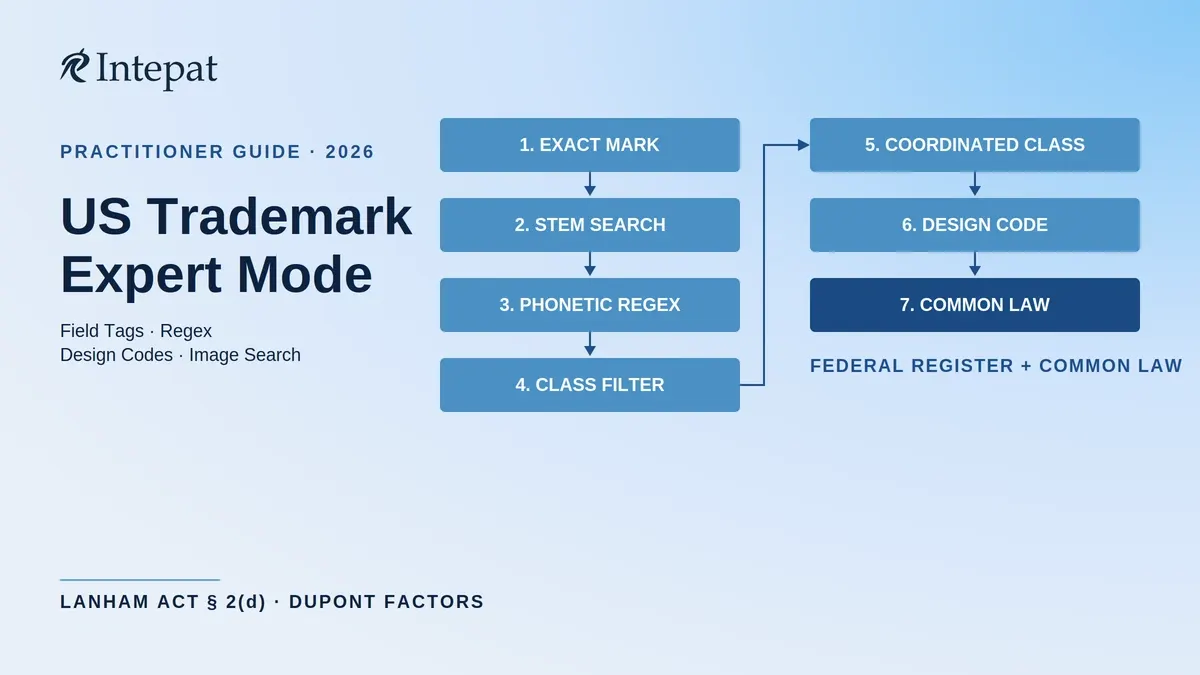
Sample Search Protocol
For an Indian applicant proposing the mark NUTRIVA in International Classes 5 (pharmaceuticals), 29 (food), and 30 (food), a structured federal-register clearance proceeds in seven steps:
- Exact mark search: CM:nutriva AND LD:true
- Stem search: CM:nutr* AND LD:true
- Phonetic variants: CM:/(nutriva|nutreva|newtriva|nutrieva|nutryva)/ AND LD:true
- Class filter: (IC:005 OR IC:029 OR IC:030) AND LD:true
- Coordinated-class scan: repeat with CC: field to surface conflicts in commercially related classes the applicant’s filed class alone would not catch
- Logo search: identify Design Search Codes for any figurative element and run DC:<code> AND <class filter> AND LD:true; supplement with the upload-image feature for a similarity scan
- Common-law layer: internet, domain registry, social media, and trade-directory checks for unregistered use of the mark or close variants in the same field of trade
The output of steps 1 through 6 is the federal-register conflict set; the output of step 7 is the common-law conflict set. Both feed into the Section 2(d) and Section 43(a) risk view that informs the file or do-not-file decision.
What the USPTO Federal Search Does Not Cover
A clean result on tmsearch.uspto.gov is a favourable starting point, not complete clearance. Three categories of conflict fall outside the federal register.
Common-law unregistered marks. Trademark rights in the United States arise from use in commerce, not from registration. A business that has been using a mark in trade in one or more states may hold enforceable common-law rights in those geographic areas regardless of whether the mark appears on the federal register. The USPTO’s own clearance search guidance recommends supplementing the federal search with an internet-based search for third-party use of the mark and similar marks with related goods or services. For an Indian filer accustomed to the register-led Indian system, this is the single largest blind spot in DIY US clearance.
State trademark registers. Each of the 50 states, plus the District of Columbia and Puerto Rico, maintains a state-level trademark register. State registrations are independent of federal registration and are not searched by the federal USPTO system. A state-registered mark may not bar federal registration directly, but it can ground a passing-off-equivalent claim and a Section 1125(a) federal false-designation-of-origin claim under Section 43(a). The USPTO publishes links to all state trademark and business registries; a thorough search covers the states where the applicant plans to operate.
Foreign marks not designated in the US. Marks registered abroad without a US filing do not appear on the USPTO register. Where the applicant’s business is geographically extensive, parallel searches on WIPO’s Global Brand Database and on the relevant national registers complement the USPTO search. The WIPO Global Brand Database is the practical starting point.
Coordinating a US clearance that goes beyond the federal register?
Intepat IP delivers risk-classified search reports covering federal, state, and common-law sources, in partnership with US-licensed counsel where required. Request a US clearance review.
Reading and Interpreting Results
The USPTO Trademark Search system returns results as a tabular list with the serial or registration number, the mark, the class, the owner, and the live or dead status. Opening a result expands the record. For logged-in users, the details panel shows TSDR (Trademark Status and Document Retrieval) information without leaving the search system.
The live-or-dead status is the first triage filter. A live registration can be cited as a Section 2(d) bar in the examination report. A live earlier-filed pending application may also create prosecution risk because the USPTO can suspend the later application pending the earlier application’s outcome under TMEP Section 716.02(c). A dead federal record is generally not cited as a live Section 2(d) bar, but it may still point to a prior user with residual common-law rights, which the federal search did not catch. Common live statuses include:
- Registered: mark is on the Principal or Supplemental Register and in force
- Live / pending: application is moving through examination
- Published for opposition: 30-day opposition window is open or recently closed (the window is extendable on request under Section 13)
- Opposed: a notice of opposition has been filed before the Trademark Trial and Appeal Board
For each live result, three questions follow: Is the mark similar to the proposed mark in appearance, sound, or commercial impression? Are the goods or services the same as or commercially related to the proposed mark’s identification? Is the owner a separate legal entity (the Section 2(d) bar does not generally apply to marks of the same owner under TMEP Section 1207.01(d), subject to unity-of-control analysis)? Where a result triggers concern on all three questions and an Office Action is foreseeable, the trademark objection response guidance (written in the Indian context, but directionally applicable) is the next reading.
When to Engage US Counsel
A self-conducted USPTO clearance search using Expert mode, field tags, and design codes is sound preliminary work. It is not a substitute for a written US registrability opinion in the following situations.
Where the search returns borderline results (similar but not identical marks, related but not identical goods or services), the Section 2(d) analysis applies the DuPont factors. The TMEP at §1207.01 makes clear there is no mechanical test and each case turns on its own facts. Indian filers, examining the same DuPont factors that a USPTO examining attorney will apply, benefit from US counsel’s experience of which factors the assigned examining attorney’s art unit weights most heavily in practice.
Where the proposed mark is being filed via Madrid Section 66(a), a Section 2(d) refusal during USPTO examination is a partial refusal that affects the US designation only. Responding requires a US-licensed attorney to file the response in the USPTO records. The Indian agent or attorney prosecuting the Madrid International Registration is not authorised to respond directly. The Intepat trademark search services page sets out the scope of professional US clearance work coordinated with US counsel.
Where the brand has significant commercial value, the cost of a written US registrability opinion is well below the cost of handling a Section 2(d) office action, opposition before the Trademark Trial and Appeal Board, or an injunction proceeding in a federal district court after the brand has launched in the US.
A further practitioner technique is to check the Trademark Trial and Appeal Board (TTAB) records (accessible at the TTABVUE database) for any inter partes proceedings involving the cited earlier mark. A registered mark with an active cancellation petition or a history of opposition proceedings may be more vulnerable, or may have a recent settlement agreement on file that bears on the §2(d) analysis. This level of inquiry sits beyond a routine USPTO Trademark Search and is one of the value layers that US counsel adds to a clearance opinion.
Frequently Asked Questions
TESS (Trademark Electronic Search System) was the USPTO’s public search system for over two decades before its retirement on 30 November 2023. The replacement is the Cloud-based USPTO Trademark Search at tmsearch.uspto.gov. The new system uses Boolean operators, field tags, wildcards, and regex syntax. Old TESS URLs redirect; old TESS search strings do not work without re-formatting.
Yes, the search itself is free and accessible to anyone. Running a public-database search and a common-law trademark search using internet sources are generally administrative or preliminary clearance activities. Providing a legal opinion on registrability, likelihood of confusion under Section 2(d), Office Action response strategy, or any other substantive question of US trademark law should be handled by US-qualified counsel. For Madrid §66(a) extensions in particular, the response to any Office Action issued by the USPTO examining attorney must be filed by a US-licensed attorney.
Section 2(d) of the Lanham Act and Section 11 of the Indian Trade Marks Act, 1999 both bar registration where there is a likelihood of confusion with an earlier mark for related goods or services. The principal practical difference is that the US federal register search does not cover common-law unregistered marks, which can hold enforceable rights in the geographic area of use. A US clearance therefore requires a separate internet-based common-law search and, where the applicant plans state-specific operations, a state register search. The Indian register search is often more central to clearance because Indian practice is more register-led, though passing-off rights under Section 27(2) of the Trade Marks Act, 1999 remain independently relevant.
The USPTO Design Search Code Manual is a US-specific classification of figurative elements used to search the federal register for design marks. Each code is a six-digit number organised as Category.Division.Section. The WIPO Vienna Classification used by the Indian Registry and by EUIPO is a separate system. The two classifications are not interchangeable: a Vienna code from an Indian device-mark search cannot be entered directly into the USPTO DC: field. For a brand filed in both jurisdictions, the practitioner identifies the figurative elements once and then maps them to each system’s codes separately.
The response period depends on the application’s filing basis. Under the Trademark Modernization Act, effective 3 December 2022, applications filed under Section 1 (use-in-commerce or intent-to-use) or Section 44 (Paris Convention foreign filing) have three months from the Office Action issue date to respond, with a single three-month extension available for a fee. Applications filed under Section 66(a) (Madrid Protocol extension) retain the six-month response period with no option to extend, because Article 5(2) of the Madrid Protocol requires a fixed notification period. Indian applicants extending to the US via Madrid should plan their response timeline around six months; applicants filing under Paris or directly under Section 1 should plan around three months plus the optional extension.
No. The image search feature is a useful first pass for composite logos because it surfaces visually similar marks without requiring the practitioner to identify codes manually. The design code search is the controlled second pass that catches marks the image similarity algorithm may miss, particularly where the figurative element is rendered in a different style but represents the same subject (for example, a stylised star versus a geometric star). A thorough clearance uses both.
No. A clean USPTO federal search means no obvious conflict was identified in the federal application and registration database based on the search strategy used. It does not rule out common-law users who have built rights through actual use in commerce, marks registered at the state level rather than federally, domain-name use, marketplace listings, or social media use. For a US launch decision, the federal search must be supplemented by a common-law trademark search across internet and trade-directory sources and, where the brand carries significant commercial value, by review from US-qualified counsel.
Next Steps
For the conflict standard, Section 11 framework, and risk-classified output approach used in Indian practice, see Trademark Search in India: Complete Guide.
For procedural follow-through on a USPTO Office Action raising Section 2(d) refusal, see responding to a USPTO Office Action.
For coordinated US clearance work delivered by Intepat IP in partnership with US-licensed counsel, see the trademark search services page.
For the broader US extension workflow once clearance is complete, see trademark registration services.
This article provides general information on US trademark search procedure and does not constitute US legal advice. The Lanham Act (15 U.S.C. Chapter 22), TMEP, and USPTO Trademark Search system features are verified as of May 2026. Indian applicants extending to the US should engage US-qualified counsel for substantive registrability advice and filing strategy.